

Insurance claims often slow down when employees move information between intake forms, policy systems, document repositories, email, CRM tools, and review queues. Each handoff can create extra data entry, lookups, updates, or waiting.
For Waterloo InsurTech firms, RPA insurance claims processing can reduce that administrative work by automating stable, rule-based steps. Used carefully, insurance claims automation can move data, retrieve records, route work, and update systems while claims specialists remain responsible for decisions requiring judgment.
This article explains where RPA fits, which tasks suit automation, how it can connect with existing insurance software, and where human review should remain.
The Real Bottlenecks Are Usually Between Claims Tasks
A claims workflow can involve several systems introduced at different times for different purposes. The problem is often not that a policy lookup or status update is difficult. It is that someone has to repeat the same action across systems.
Bottlenecks include:
- re-entering claim information from a portal into another application
- downloading supporting files and attaching them to the correct record
- switching systems to retrieve policy details
- checking whether required fields or documents are present
- sending incomplete cases to the right follow-up queue
- updating claim status in more than one place
This is where robotic process automation in insurance is most useful. RPA can follow defined steps across applications and handle repetitive actions consistently. The goal of claims processing automation is not to remove claims expertise. It is to reduce the manual work around that expertise so staff can focus on exceptions, investigation, communication, and decisions.
What an RPA-Assisted Claim Can Look Like from FNOL to Review
How does RPA speed up an insurance claim? It can reduce repetitive data entry, system switching, lookups, routing, and status updates. It does not need to make every claims decision automatically.
Capture the First Notice of Loss
A claim may begin through a web form, mobile app, customer portal, email, or another intake channel. With FNOL automation, structured information can be taken from the intake process and used to create or update a claim record.
If supporting documents arrive as PDFs, scans, or images, RPA may need help from OCR or intelligent document processing. Those tools can extract information from less structured files, while RPA handles the next defined action, such as placing data in a claims system or routing the file.
Check Required Information and Retrieve Policy Data
During claims intake automation, a bot can follow predefined rules to check whether mandatory fields are populated, retrieve a policy record, collect basic policy details, or identify missing information.
This is different from deciding whether a claim should be accepted. The bot can prepare the case and flag issues, but unusual policy conditions or conflicting information should go to the appropriate claims professional.
Move Data Between Claims Systems
Insurance workflows may require information to move between systems that do not share every field automatically. RPA can interact with established user interfaces and repeat structured steps an employee would otherwise perform.
APIs are generally a better fit where reliable system-to-system integration is available. RPA becomes useful when a stable interface still requires repetitive user actions or an existing workflow contains integration gaps.
For InsurTech teams evaluating RPA solutions in Waterloo, a practical starting point is to identify handoffs that consume staff time but do not require claims judgment.
Route Routine Work and Exceptions Differently
RPA for insurance claims can apply predefined routing rules after information has been collected. A complete submission can move to the next processing queue, while an incomplete case can go to follow-up. A system mismatch can be sent to an exception queue, and a case requiring interpretation can be assigned to a claims specialist.
Good automation design should make it clear where the bot stops and where a person takes over.
Update Status and Trigger Routine Communications
In an automated claims processing workflow, RPA can update predefined status fields after a known event or trigger an approved communication process. For example, the system may send a standard request for missing documentation after a configured completeness check.
Customer communications should still follow controlled templates, approved business rules, and defined escalation paths. Automation should not invent claim decisions or create unsupported explanations.
What RPA Should Automate, and What Should Stay with People
A suitable use of insurance workflow automation is usually the repetitive work around a claim, not the professional judgment inside a complex claim.
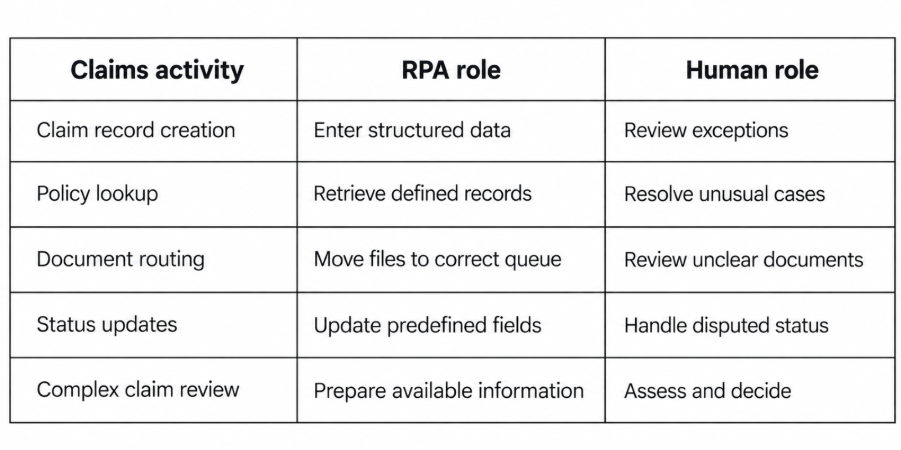
RPA, OCR, IDP, business rules, and human review play different roles. RPA follows configured application steps. OCR or IDP extracts document information. Rules evaluate predefined conditions. Claims professionals handle interpretation, unusual evidence, disputes, and judgment.
This division also makes exceptions easier to manage. The workflow can stop when data is missing, a system returns an unexpected result, or a defined review condition is met.
RPA Does Not Require Replacing the Existing Claims Platform
An InsurTech company may already use a claims platform, policy administration system, CRM, document repository, finance software, and internal portals. RPA can often be introduced around those systems without a complete platform replacement.
API-Based Connections
Where a system provides a stable API, direct integration can provide structured data exchange without depending on screen layouts. APIs are useful when applications need to share claim records, policy information, status changes, or other defined data directly.
RPA for Existing Interfaces and Workflow Gaps
RPA is useful when a process still depends on actions performed through an existing user interface. A bot can log in with controlled credentials, follow a defined sequence, retrieve information, enter data, or move a case to the next step.
Interface changes can affect these automations, so monitoring and maintenance need to be part of the design. Theta Technolabs' RPA and intelligent automation services in Canada cover bot development, integration, monitoring, and technologies such as UiPath, Automation Anywhere, REST APIs, and audit logs.
Claims Automation Still Needs Privacy, Access Control and Auditability
Claims workflows may involve personal and financial information, so faster processing cannot come at the expense of appropriate safeguards.
The Office of the Privacy Commissioner of Canada explains under PIPEDA's safeguards principle that personal information should be protected according to its sensitivity. It identifies measures such as passwords, encryption, limiting access, security policies, and regular review of safeguards.
For an RPA workflow, that means considering role-based access, controlled bot credentials, appropriate encryption, activity logs, exception logs, and permissions that give a bot only the access required. Human review should remain available for unusual circumstances or consequential decisions.
RPA is part of the processing environment. It does not remove the organization's responsibility to protect claimant and policyholder information.
How a Waterloo InsurTech Firm Can Start Without Automating the Whole Claims Process
A practical starting point for insurance claims automation in Waterloo is a bounded workflow with clear inputs, rules, outputs, and exception paths.
A practical implementation sequence is:
- Map the current claims journey. Document the systems, manual handoffs, repeated data entry, and review points.
- Find stable rule-based tasks. Look for actions with predictable inputs and outputs.
- Separate processing from judgment. Define where a bot can continue and where a claims professional must take over.
- Design exception paths early. Decide what happens when information is missing, a system is unavailable, or the bot cannot complete a step.
- Start with a bounded workflow. Intake updates, policy lookups, record creation, or routine routing can be easier to control than broad end-to-end automation.
- Monitor after deployment. Review bot failures, interface changes, access permissions, and recurring exceptions.
Teams that need help assessing processes and defining an implementation plan can use RPA consulting services in Canada to identify suitable automation points before development begins.
Frequently Asked Questions
What insurance claims tasks can RPA automate?
RPA can automate stable, rule-based tasks such as claim record creation, policy lookups, structured data transfer, routing, predefined status updates, and repetitive administrative steps around the claims process.
Can RPA process insurance claim documents?
RPA can move, rename, upload, and route claim documents. When information must be extracted from less structured PDFs, scans, or images, OCR or intelligent document processing is generally used alongside RPA.
Does RPA replace insurance claims adjusters?
No. RPA is suited to repetitive processing based on configured rules. Claims involving interpretation, investigation, conflicting evidence, unusual policy conditions, or professional judgment should remain with appropriate claims staff.
Can RPA integrate with an existing claims management system?
Yes, depending on the system. Integration can use APIs, RPA interactions with an existing user interface, or a combination of both. The right approach depends on the available interfaces and workflow.
What is FNOL automation?
First Notice of Loss automation supports the initial reporting stage of a claim. It can help capture submitted information, create a claim record, check completeness, and route the case into the appropriate next step.
Building a Faster Claims Workflow Without Removing Human Control
RPA can reduce repetitive claims administration by moving information, retrieving records, updating systems, and routing work through defined rules. Effective implementations also include clear exception paths, controlled access, monitoring, and human review where judgment is needed.
Theta Technolabs can assess an existing claims workflow, design suitable automation steps, integrate bots with current systems, and support monitoring using technologies such as UiPath, Automation Anywhere, and REST APIs. To discuss an RPA claims automation project with Theta Technolabs, contact sales@thetatechnolabs.com.